6 September 2026 · 7 min read
Get Your Domain on "Sign in with Google," Not Your Supabase Project ID

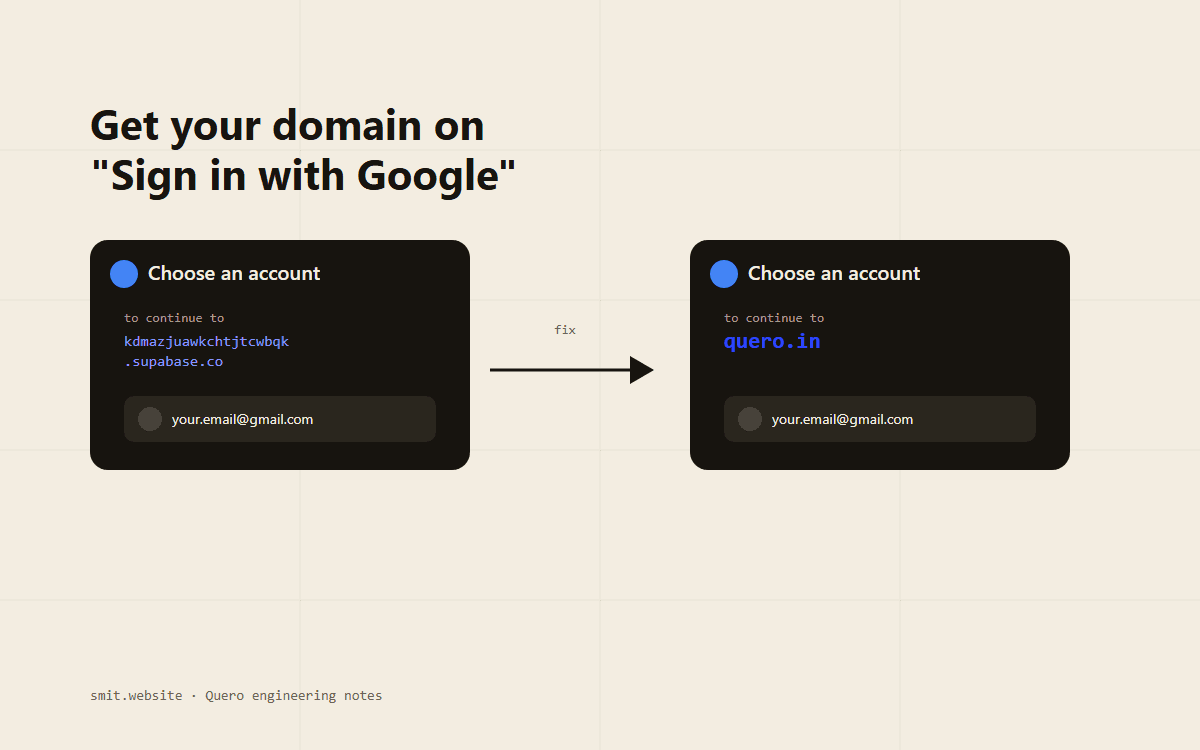
A student opens Quero, clicks "Continue with Google," and the popup that greets them says: "Choose an account to continue to kdmazjuawkchtjtcwbqk.supabase.co." Not quero.in. Not Quero. A 20-character database identifier that belongs to infrastructure the student has never heard of and has no reason to trust. It works fine, technically. It also looks exactly like the kind of screen a phishing tutorial uses as its before-picture.
This is the default behavior of Supabase's built-in Google login, and it's not a bug, it's just nobody's branding. Fixing it turned out to be less about Supabase settings and more about understanding a detail of OAuth that most integrations paper over entirely: Google doesn't display your app's name on that screen. It displays whoever is actually asking.
Why Supabase's URL, and not Quero's
Supabase's one-line "sign in with Google" setup works by hosting the entire OAuth handshake for you. Your app calls `supabase.auth.signInWithOAuth()`, which redirects the browser to Supabase's own `/auth/v1/authorize` endpoint, which redirects to Google, which redirects back to Supabase's own `/auth/v1/callback`, which finally hands your app a session. Convenient, and completely invisible to the user, except for one moment: Google has to tell the user who's requesting access to their account before they grant it, and the only source of truth it has for that is the redirect URI baked into the OAuth client making the request. That URI is `https://<your-project-ref>.supabase.co/auth/v1/callback`, registered by Supabase, not you. So that's what gets shown, verbatim.
The consent screen isn't rendering your app's name from a settings page somewhere. It's rendering the domain of whichever OAuth client is actually making the request, full stop. Everything else about a custom Google login is downstream of that one fact.
Who Google thinks it's talking to
Google's account picker shows “to continue to kdmazjuawkchtjtcwbqk.supabase.co”
Google always shows the domain registered against whichever OAuth client is actually making the request — not your app's name, not a setting in Supabase. The only way to change it is to change which client is doing the asking.
Two ways to change who's asking
Once that's clear, there are exactly two ways to make quero.in the thing Google shows: move the entire hosted redirect (Supabase's `/auth/v1/authorize` and `/auth/v1/callback`) onto quero.in's own DNS, or stop letting Supabase host the redirect at all and run the OAuth handshake with your own client instead.
| Option | How it works | Cost |
|---|---|---|
| Supabase Custom Domains | Supabase's auth endpoints get served from e.g. auth.quero.in via a paid add-on, so the redirect URI Google sees is already yours | Pro plan + custom domain add-on, ~$10/mo |
| Google Identity Services (GIS) | Skip Supabase's hosted redirect entirely. Run Google's own sign-in widget with your own OAuth client on your own domain, then hand the resulting token to Supabase directly | Free |
For a bootstrapped exam-prep platform, the second option was the only one on the table. It also happens to be the technically more interesting one, because it means Quero owns the Google handshake instead of proxying it through someone else's infrastructure.
Registering Quero as its own OAuth client
The first half of the fix happens entirely in Google Cloud Console, before a single line of code changes. An OAuth consent screen (External audience, since Quero is a public product, not a Workspace-internal tool) and a Web application OAuth client, with Authorized JavaScript origins set to `https://quero.in` and `http://localhost:3000`. No redirect URI needed here, because the flow this client drives never redirects anywhere; it hands back a signed token directly in the browser.
Trading a redirect for a token
Google Identity Services (the library behind the modern "Sign in with Google" button) can render its own button, open its own popup, and return a signed ID token straight to a JavaScript callback, no server round trip through anyone's `/callback` route required. Supabase, in turn, has a method built for exactly this handoff: `signInWithIdToken()`, which takes that token and turns it into a normal Supabase session, cookies and all, as if the user had signed in any other way.
const { raw, hashed } = await generateNonce(); // SHA-256 of a random UUID

google.accounts.id.initialize({
  client_id: GOOGLE_CLIENT_ID,
  nonce: hashed, // sent to Google, proves this exact token was minted for this exact attempt
  callback: async ({ credential }) => {
    const { error } = await supabase.auth.signInWithIdToken({
      provider: "google",
      token: credential,
      nonce: raw, // Supabase re-hashes this and checks it matches what Google signed
    });
  },
});

google.accounts.id.renderButton(container, { theme: "filled_black" });
The nonce round trip is the part that's easy to skip and shouldn't be. Without it, a token stolen off the wire (or replayed from a previous, unrelated sign-in) would be just as valid as a fresh one. Hashing a fresh random value, handing the hash to Google to sign into the token, and giving Supabase the original to re-hash and compare is what ties one specific token to one specific sign-in attempt.
The wrinkle nobody warns you about
Quero's sign-in isn't a single button, it's four role-scoped tabs (student, institute, mentor, admin), and the account's actual role has to match the tab someone picked, or an institute admin could quietly sign in as a student and vice versa. That check used to live entirely in `/api/auth/callback`, the route Supabase's redirect flow always landed on before reaching the dashboard. Switching to `signInWithIdToken()` meant that route stopped being part of the Google path at all, the session now gets created directly in the browser, with nothing server-side ever running.
- The role-validation logic (check the account's real role, reject a mismatched tab, sign the user back out if it's wrong) had to move into a server action, called immediately after the client-side sign-in succeeds, not deleted.
- Getting this wrong silently would have meant Google sign-in bypassing a security check that password sign-in still enforced, exactly the kind of gap that never shows up until someone finds it on purpose.
- The fix was mechanical once spotted: port the same institute-role lookup and role-mismatch rejection from the old callback route into a `completeGoogleSignIn(requestedRole)` server action, and call it right after `signInWithIdToken()` resolves.
One more surprise: the button that wouldn't go dark
Google's rendered button accepts a `theme: "filled_black"` option, which should have matched Quero's all-dark UI immediately. It didn't, it rendered light, every time, regardless of the theme prop. The actual cause: recent versions of Google Identity Services partly infer the button's color scheme from the page's own `color-scheme` CSS property, not just the explicit theme parameter, and Quero's stylesheet never declared one. Adding `color-scheme: dark` to `html` (which a purely dark-mode site should have anyway, for native form controls and scrollbars) was what actually made the theme prop take effect.
A parameter you pass explicitly can still lose to a page-level default you never set. Third-party embeds increasingly read ambient page signals, not just their own config, which is a detail worth checking before assuming a prop simply doesn't work.
Leaving testing mode
One last gate: a freshly created OAuth consent screen starts in Testing, where only explicitly added test-user emails can complete sign-in, everyone else gets rejected before they ever see the picker. Since Quero only requests basic scopes (`openid`, `email`, `profile`), publishing the app to production doesn't require Google's manual verification review, that's reserved for sensitive or restricted scopes. It's a single button in Google Cloud Console's Audience tab, and after clicking it, publishing status flips from Testing to "In production," and any Google account, not just the ones on a list, can sign in.
Frequently Asked Questions
Does Supabase's Google provider config still matter?
Yes, just for a smaller job than before. Supabase still needs the same OAuth Client ID entered under Authentication → Providers → Google, because `signInWithIdToken()` verifies that the token's audience matches a client ID Supabase trusts. What Supabase no longer does is host the redirect or decide what domain Google displays.
Is this still "Supabase Auth"?
Entirely. Sessions, cookies, and the JWTs issued afterward are all normal Supabase Auth output. The only thing that changed is how the ID token reaches Supabase in the first place, directly from the browser instead of via Supabase's own hosted OAuth redirect.
Would the paid custom-domain route have been simpler?
For a team that can afford the add-on, probably, it's a DNS change with no code path to rewrite. It just wasn't an option here, and building the GIS path directly ended up teaching more about what the consent screen actually reads from, which is the more durable thing to understand regardless of which auth provider a future project uses.
The actual takeaway
The consent screen was never a Supabase problem or a branding problem, it was a question of which OAuth client's name was on the request, and Supabase's hosted flow meant that client was never Quero's own. Once that clicked, everything else, the Google Cloud client, the nonce, the server action ported over from the old callback route, the stray `color-scheme` default, was just the mechanical work of becoming the thing Google was actually talking to.